Keep full-view supervision. Control temporary memory at high resolution.
Same starting model. Higher image resolution. Starting from the same Bicycle model with 5.99 million Gaussians, we keep the views and field of view unchanged and increase image width from 1K to 16K. We compare the temporary working set, training computation time, and L1 loss.
Follow the growing orange area. Original retains rasterization caches for the whole image until backpropagation. More pixels and Gaussian intersections mean a larger temporary working set, reaching out-of-memory at 12K.
B · BoundedGS
Higher resolution, a steady working set.
From 1K to 16K, the curve stays near 1.07 GiB. Each region releases its local state when its computation finishes, so more pixels no longer require all rasterization caches to coexist.
There is no orange at this peak: it occurs during projection backward, after rasterization caches have been released. See the cache lifetime in Figure 3 ↘
C · Time and agreement
Faster computation, nearly identical L1.
The blue time curve stays below the gray one: at 11K, time falls from 21.76 to 19.79 seconds. The purple difference curve hugs zero, with a maximum relative L1 loss difference of about 6.77 × 10⁻⁷.
Figure 4 · The working set is temporary GPU memory beyond persistent model and training state. A/B show the peak composition for one fixed view; C times the second pass over 169 views and compares L1 on the same fixed view. 1K = 1,024 pixels in width. Original’s dashed segment is an extrapolation beyond the out-of-memory boundary.
01 / Problem & insight
Collect gradients from the full view. Release local caches along the way.
Higher resolution brings more pixels and more intersections between Gaussians and image tiles. Rasterization caches coexist with projection and gradient state, together creating the training memory peak.
Scroll sideways to see the full chart ↔
The peak depends on what is alive together. Figure 1 traces one view of the Bicycle model trained for 15,000 steps. Colors show concurrent projection, gradient, and rasterization / supervision / loss state; the red marker identifies the 9.551 GiB peak. The horizontal axis is allocation-event order, not elapsed time.
Complete gradients do not require every cache at once.
Gaussian parameters stay fixed within a view. Once a region finishes rasterization, loss, and backward computation, its gradient contribution can be accumulated and its local caches released before the next region runs.
Partition by workload, not just image area.
Two regions with the same area can contain very different numbers of Gaussian intersections. BoundedGS estimates load from intersections, pixels, and buffer layout, using smaller regions where the workload is dense and larger ones where it is sparse.
The regions still cover the entire image and share one camera and global model. Accumulate gradients across the whole view, then update the parameters once.
02 / Method
Release local caches sooner. Then address projection and gradient peaks.
Figure 3 follows one sequence of changes: A executes the full image; B separates the two backward stages; C bounds local rasterization; D and E compact projection and gradients; F explores a smaller budget and more groups.
Projection + handoffParameter / projection gradientsRaster / GT / loss
A: Rasterization and backward state coexist around the peak.
Horizontal: allocation-event order from 0% to 100%. Vertical: working set in GiB. A–C and D–F use different vertical ranges.
After each change, look at what still sets the peak. Figure 3 traces one view of the Bicycle model trained for 15,000 steps. Colors show concurrent state; red markers locate the peaks. A–C and D–F use different vertical ranges, so compare the values.
A → B
Separate backward stages to release caches sooner
First complete rasterization backward and collect gradients of projected attributes, then run projection backward. Rasterization caches can leave memory before later gradient state grows.
B → C
Bound local rasterization with a workload budget
Split the image into leaves, each completing forward, loss, and backward computation. Regions that exceed the budget are subdivided further. A layout can be cached per camera, with its current load checked before every execution.
C → D → E
Keep detailed state for candidate Gaussians
As local caches shrink, full-model projection and gradients become the next bottleneck. Candidate-indexed projection and compact gradients retain detailed state only for Gaussians that may contribute to the current view.
Carry the same principle into full training.
More projection groups and a smaller leaf budget (F) can reduce the working set further, with more execution overhead. Beyond rendering, CPU-assisted structure rebuilding and bounded image supply help control resource use throughout training.
384 MiB is the local rasterization budget, not a limit on the whole training process. Local SSIM windows differ from full-image SSIM at region boundaries; final quality is evaluated on complete images.
03 / Results
A much smaller working set. Comparable quality and training efficiency.
We train 13 scenes at their native high resolutions for 30,000 steps on an RTX 4090. Original is the full-image execution baseline in the same training framework; both methods use the same initialization procedure and Gaussian-count schedule.
9.97 → 1.76 GiBMean rendering working set · five 5K outdoor scenes
36.7 → 33.9 minMean full-training time · the same five scenes
24.44 → 24.42 dBMean PSNR · the same five scenes
Full training across three scene groups
Table 1
Scene group / native resolution
Method
PSNR ↑
SSIM ↑
LPIPS ↓
Time ↓minutes
Working set ↓GiB
Mip-NeRF 360 outdoor5 scenes · 5K
Original
24.44
0.739
0.314
36.7
9.97
BoundedGS
24.42
0.739
0.314
33.9
1.76
Mip-NeRF 360 indoor4 scenes · 3K
Original
31.52
0.932
0.239
16.5
4.43
BoundedGS
31.64
0.932
0.239
15.9
0.87
Tanks and Temples4 scenes · 4K
Original
22.92
0.764
0.294
23.2
7.65
BoundedGS
22.91
0.764
0.294
23.0
1.79
Scroll sideways to see the full table ↔
Values, precision, and bold working-set entries follow Table 1. Scenes are weighted equally within each group. Working set is the mean of per-scene temporary rendering peaks; training time excludes evaluation, video, PLY saving, and resource monitoring. ↑ Higher is better. ↓ Lower is better.
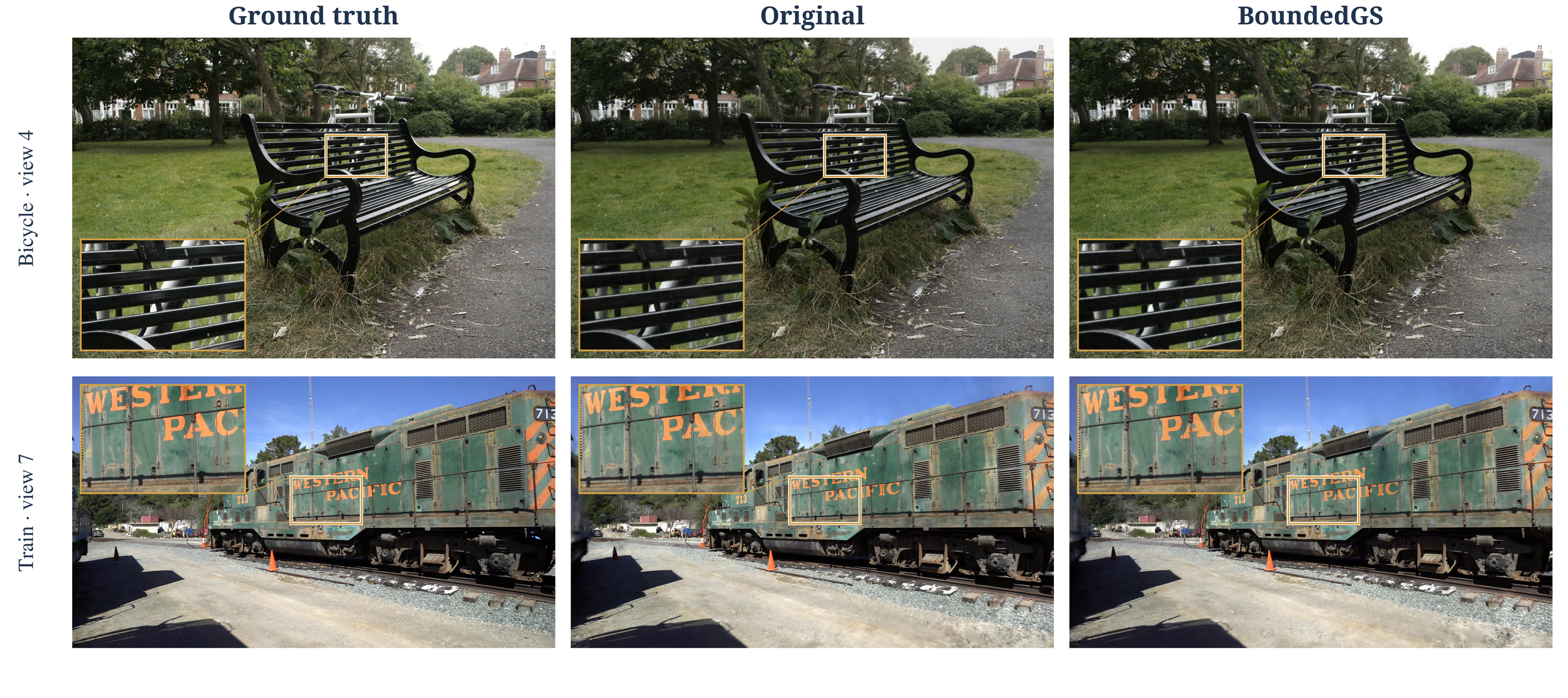
Reconstruction details: bench edges and train lettering
Figure 2
Scroll sideways to compare all three columns ↔
Left to right: ground truth, Original, and BoundedGS. Rows show Bicycle test view 4 and Train test view 7. Insets highlight fine lines, occlusion boundaries, and lettering.
Component ablation: what does each step remove?
Table 2
Along A→E in Figure 3, releasing rasterization caches, bounding local load, and compacting projection and gradients reduce the mean working set from 9.980 to 1.662 GiB across five scenes, while also reducing computation time. F saves more memory with a smaller budget, but takes longer.
Configuration
Working set / GiB ↓
Second-pass time / s ↓
Render similarity SSIM ↑
A · Original
9.980
12.19
1.000000
B · Separate backward stages
7.638
11.35
0.999991
C · Bounded local rasterization
5.046
12.04
0.999991
D · Candidate-indexed projection
3.274
11.23
0.999990
E · Compact gradients (BoundedGS)
1.662
10.46
0.999991
F · 3 × 3 groups / 128 MiB
1.305
12.69
0.999991
Scroll sideways to see the full table ↔
Fixed-model training simulations, averaged over the second pass across five scenes. SSIM measures render similarity to Original; closer to 1 means more similar.
Why not just split the image into uniform blocks?
Figures 5 / 6
Splitting into blocks can also save memory. The key questions are how to choose block size, and how much work to repeat for each block. We first give fixed blocks compact projection and gradients too, then compare partitioning strategies and the cost of per-block updates.
Figure 5 · Fixed pixels vs. workload-based regions
With compact state in both paths, Auto Leaf still improves efficiency.
Use the same Bicycle model with 5.99 million Gaussians and increase resolution from 2K to 16K. All three paths separate stages and compact projection and gradients. A/B use blocks 2K pixels wide; C partitions by a 384 MiB workload budget.
Scroll sideways to see all four panels ↔
Start with B and C: both update once per view, but Auto Leaf has a lower, steadier working set. Then look at D: the time cost of fixed blocks becomes more noticeable as resolution increases.
B → C: one update per view, a better fit to local load. A fixed-area block can still contain dense Gaussian intersections. Auto Leaf adjusts region size to the load, keeping the working set near 1.07 GiB. At 16K, time falls from 49.3 seconds with fixed blocks to 35.7 seconds.
A → D: updating every block makes memory savings expensive. At 16K, an 8 × 8 grid means 64 parameter updates per view, along with repeated screening, projection, and gradient construction. This pass takes 149.4 seconds.
Figure 5 takeaway: local workload sets cache size; a single update after the full view avoids the repeated work of per-block updates.
Figure 6 · The cost of finer fixed grids
Finer grids keep cutting memory, but take longer.
Switch to a Bicycle model with 11.98 million Gaussians and compare 1 × 1, 2 × 2, and 4 × 4 grids, updating each block independently. The top row repeats full projection; the bottom row already uses stage separation, candidate projection, and compact gradients.
Scroll sideways to see all six panels ↔
Compare the top and bottom rows: compact projection and gradients do reduce the peak. Then follow D→E→F: finer grids repeat projection, backward computation, and updates more often within a view.
Compact state does not remove repeated work. The 2 × 2 and 4 × 4 grids perform 4 and 16 parameter updates per view. In the bottom row, their times rise from 21.84 to 65.36 seconds.
Compare memory and time against Auto Leaf on the same model. Auto Leaf uses 1.572 GiB and 11.57 seconds. Compact 4 × 4 reaches 0.848 GiB, saving another 0.724 GiB of temporary memory, but takes about 5.65 times as long.
Figure 6 takeaway: smaller fixed blocks can reach a lower peak; Auto Leaf offers a better memory–time trade-off by avoiding repeated computation.
The same-model Auto Leaf values come from Appendix C.2. These comparisons use the all-view peak and time labeled Warm in the figure; red Trace peak markers refer to one view.